
How to remove a category in WordPress?
If you want to remove the WordPress category, then follow this instruction:
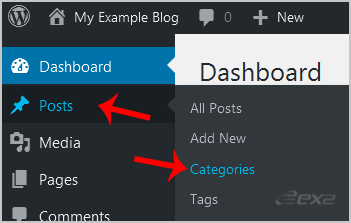
- Under the dashboard menu of the CMS, hover your mouse on Posts and then click on Categories.
- On the right side, you can see a list of categories. Hover your mouse on a category you wish to remove, and a few options will appear. Click on the Delete option. The confirmation option will appear. Click on OK.

Updated on: 14/07/2026
Thank you!